To change the contents of our site, just use the
Admin Panel
If it’s the first time you visit it you will be asked to log-in . After successful login, you should see something like the following:
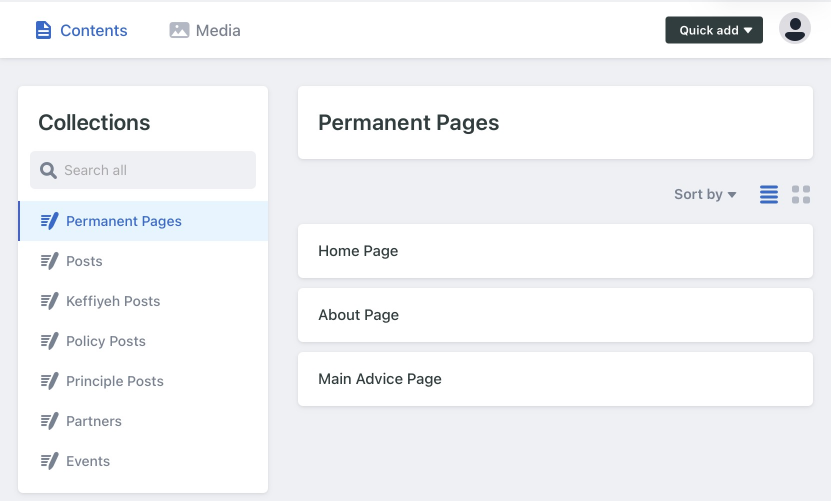
Most of our site’s web pages can be edited from this panel. Find the page you want to edit by choosing a collection on the left, and then choosing the entry for the page in question on the right.
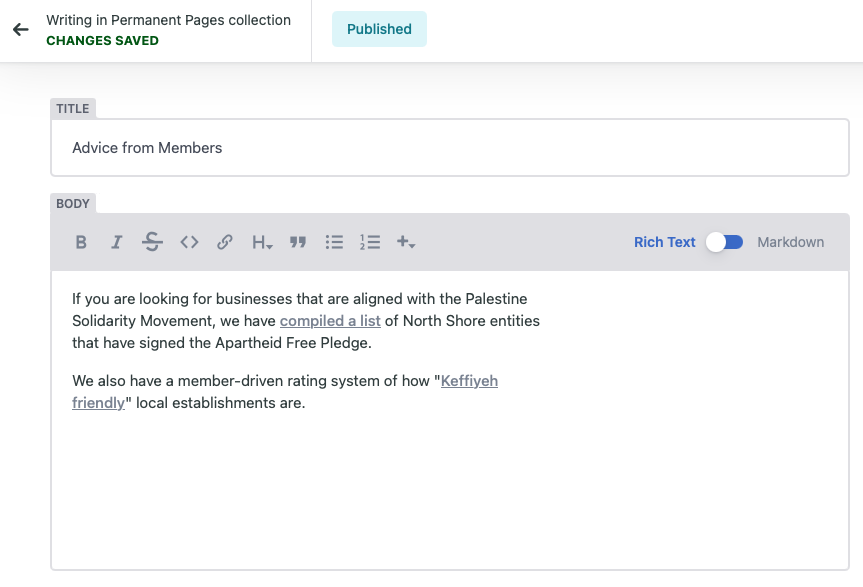
You will be shown a form that lets you edit the content of the page. You mainly should be changing the title and body fields. The body, referring to the main “body” of content on each page, is displayed in a user-friendly “Rich-Text” view. But really, that is being built from an underlying “Markdown” text (see this cheatsheet for a mostly-compatible explanation of what our website supports). You can use the toggle at the top-right of the field to switch the view between these two formats. Sometimes the “Rich-Text” view gets confused or doesn’t display correctly, so it’s good to have the option of seeing the underlying Markdown data so you can repair it or confirm that it is correct.
As soon as you change anything in the form, the top of the form will change to let you know you have unsaved changes.

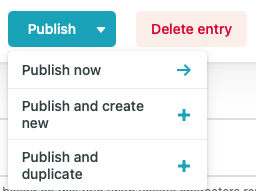
If you don’t like the changes you’ve made, click on the left-arrow, and your changes will be discarded. If you like your changes, use the Publish > Publish Now command at the top-left of the screen. This will save your changes to the cloud, and a rebuild of the official web-site will automatically begin. It should take less than a minute for your changes to appear.
There are various parts of our web-site that cannot be changed from the Admin Panel. Some pages are totally inaccessible (eg this one) and general styling and functionality changes cannot be made. For those or for any technical issues and questions, please contact your friendly web-site Anchor, Ra, on Signal.
Some Known issues
- Because of some shortcomings in the Admin Panel technology, the parent page for some collections are shown as an element of the collection. Eg there is a “Policies” post in the “Policies” collection. Other than the strange location, it all works as you would expect. Just don’t delete those please!
- The admin interface doesn’t fit nicely on phone screens. Hopefully that will be sorted out soon.